
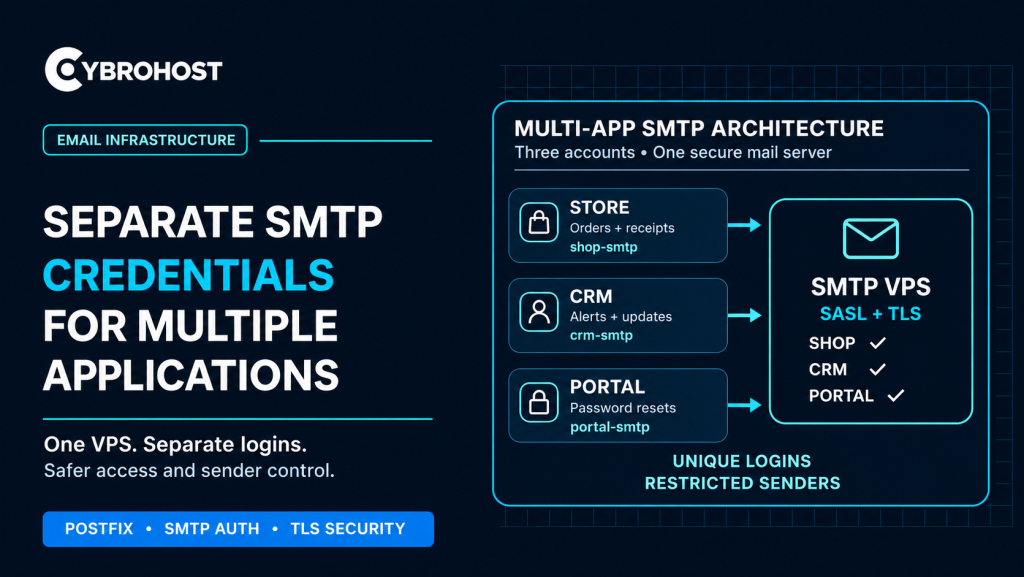
Using separate SMTP credentials for each application makes a shared mail server easier to secure and troubleshoot. Your store, CRM, and customer portal can use one SMTP VPS without sharing a password. If one account is compromised, you can disable it without changing every application’s settings.
Why Use Separate SMTP Credentials?
Shared credentials make it difficult to identify which application sent a message. They also increase the impact of leaked passwords. Instead, assign each application its own login and approved sender address.
| Application | SMTP login | Allowed sender |
|---|---|---|
| Online store | shop-smtp | orders@example.com |
| CRM | crm-smtp | alerts@example.com |
| Customer portal | portal-smtp | security@example.com |
These are examples. Create matching accounts in your actual authentication backend before testing.
Step 1: Prepare a Secure SMTP VPS
Install and update Postfix on a supported Linux distribution. Set the mail hostname, TLS certificate, and firewall rules. Use authenticated message submission on port 587 with required STARTTLS or 465 with implicit TLS.
CybroHost SMTP VPS Hosting provides self-managed Linux servers with root access and PTR/rDNS controls. Outbound port 25 is mainly relevant when delivering directly to recipient servers.
Step 2: Create One Login per Application
Set up Dovecot SASL or another Postfix-compatible authentication backend. Create three distinct accounts with strong, randomly generated passwords. Give each application only its own credentials.
Store secrets in protected environment variables or a secret manager. Never paste passwords into source code or commit them to a repository.
Step 3: Restrict Which Sender Each Login Can Use
By default, an authenticated application may submit mail using another envelope sender. Postfix can restrict this behavior with a sender-login map.
For example, create /etc/postfix/app_senders:
orders@example.com    shop-smtp
alerts@example.com    crm-smtp
security@example.com  portal-smtp
Then build its lookup database:
sudo postmap hash:/etc/postfix/app_sendersConfigure your submission service to use smtpd_sender_login_maps and reject_authenticated_sender_login_mismatch. Review the official Postfix SASL guide before changing a live configuration.
This rule protects the SMTP envelope sender. It does not automatically validate the visible From header; that requires additional policy or filtering.
Step 4: Connect and Test Every Application
Configure each app with the VPS hostname, port, TLS mode, username, and password. Send a legitimate test message from every app.
Next, deliberately test an incorrect password and an unauthorized sender. Both should fail. Run sudo postfix check, then reload Postfix only after validating your settings.
Step 5: Monitor and Rotate Credentials
Record authenticated usernames in submission logs where supported. Watch queue delays, failed logins, bounces, and unusual sending spikes. Apply application-level rate limits and alerts.
Remember that separate accounts still share the VPS mail queue and sending IP unless you configure further isolation. Rotate an affected password immediately if an app is compromised.
FAQs
Can all applications use the same SMTP port?
Yes. Each can authenticate separately through port 587 or 465, using its own username and password.
Does each SMTP account need a dedicated IP?
No. Several accounts can share one IP. Separate IPs require additional routing and infrastructure configuration.
Can Postfix enforce sender identities per login?
Yes. Sender-login maps can restrict envelope senders. Additional checks are needed for the visible From header.
Final Recommendation
Use one SMTP login per application, require TLS, restrict approved senders, and monitor activity. This improves accountability without requiring a separate VPS for every service.
